> For the complete documentation index, see [llms.txt](https://docs.pagsmile.com/llms.txt). Markdown versions of documentation pages are available by appending `.md` to page URLs; this page is available as [Markdown](https://docs.pagsmile.com/reference/remittance-api/getting-started.md).
# Getting Started
### 1. Onboarding
Business Scenario: The merchant submits onboarding materials (KYC/KYB) and actively polls the Pagsmile API to retrieve the audit results.
### 2.Create Virtual Account
Business Scenario: Conditional VA Issuance Flow The system routes the Virtual Account (VA) application workflow dynamically based on the designated `businessType`:
* Shop Collection : Store creation is a strict prerequisite. The merchant must successfully open a store before the system permits VA allocation.
* B2B Trade : The system bypasses the store validation layer and directly connects to the downstream clearings to issue the VA.
### 3.Collection
Business Scenario:Funds Credit Interception & Document Linking
Once funds reach your Virtual Account (VA), automated balance crediting may be suspended due to compliance policies based on your business type:
1. E-Commerce Platforms: A compliance hold is placed on the first-time inbound transaction only.
2. B2B Trade (Goods/Services Trade): A compliance check is enforced on every single transaction.
Action Required: In both scenarios, you must submit and link the requested compliance supporting documents (e.g., invoices, contracts) to the transaction to resume the crediting process.
### 4.Payment
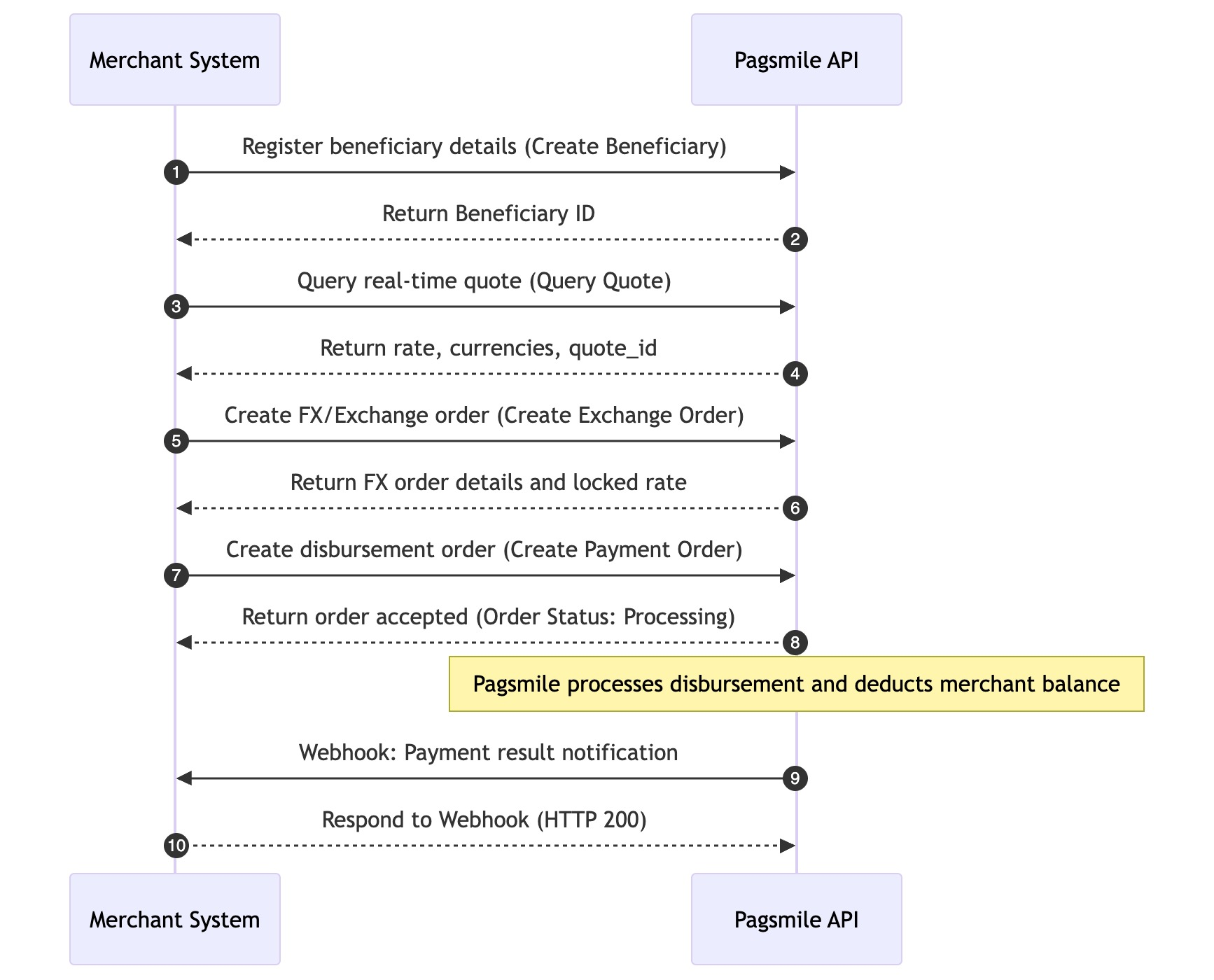
Business Scenario: Balance Deduction & Payment Execution Pipeline To deduct funds from the merchant’s account balance, the system must strictly execute the payout workflow in a sequential pipeline as follows.
### 5.Transfer
Business Scenario: Internal Fund Transfer & Asset Allocation\
This workflow handles the cross-account fund transfers, multi-currency wallet conversions, and asset rebalancing within the merchant's corporate account ecosystem. It enables seamless fund allocation between the merchant's master account, sub-accounts, or different currency ledgers within the same platform hierarchy.